OpenID Connect (OIDC) 介紹
前言
- OIDC 全名為 OpenID Connect,是一種可以 access AWS resources,但不需要存取 AWS credentials 當作 long-lived GitHub secrets 的驗證方式。
- 官方建議的驗證方式。
OIDC 優點 - 很好的安全實踐 (good security practices)
- No cloud secrets
- 不需要以 cloud credentials 當作 long-lived GitHub secrets
- 在 cloud provider 設定好 OIDC trust,github workflows 就可以利用 OIDC 從 cloud provider 取得一組 short-lived access token
- Authentication and authorization management
- 透過 cloud provider 的 authentication (authN) 與 authorization (authZ) 工具能夠控制取得 cloud resources
- 能更小粒度地控制 workflows 如何使用 credentials
- Rotating credentials
- cloud provider 提供一組 short-lived access token 給一個 job,使用完畢後會自動過期。
OIDC 的運作方式與信任機制
運作方式
- 主要是兩個角色的互動,分別為 Cloud Provider 與 Github OIDC Provider
- 互動過程 :
- In your cloud provider, create an OIDC trust between your cloud role and your GitHub workflow(s) that need access to the cloud.
- Every time your job runs, GitHub’s OIDC Provider auto-generates an OIDC token. This token contains multiple claims to establish a security-hardened and verifiable identity about the specific workflow that is trying to authenticate.
- You could include a step or action in your job to request this token from GitHub’s OIDC provider, and present it to the cloud provider.
- Once the cloud provider successfully validates the claims presented in the token, it then provides a short-lived cloud access token that is available only for the duration of the job.
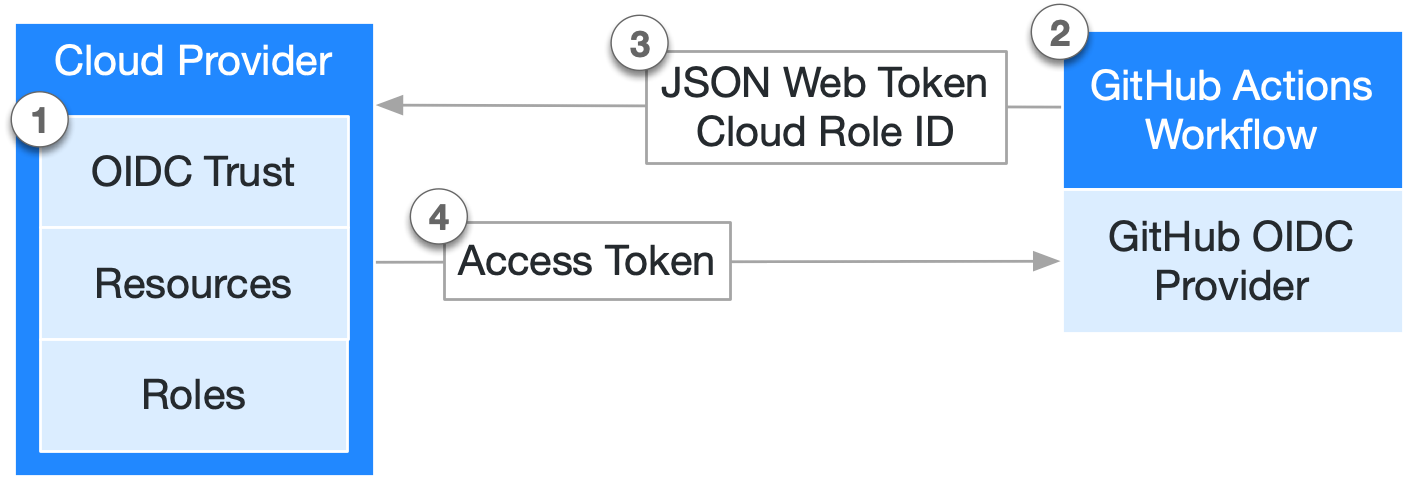
- 可參考官方文件
安全 - OIDC trust
- 當設定 cloud 能信任 GitHub’s OIDC provider 後,必須加上一些情境去過濾掉 requests,避免沒有取得信任的 repositories or workflows 可以透過 access token 操作你的 cloud resources。
Configuring OpenID Connect in Amazon Web Services
前言
- 目的是 Use OpenID Connect within your workflows to authenticate with Amazon Web Services.
- 官方文件
IAM Role
1. Create a iam role
- 建立一組 iam role,用於上傳 docker image 到 private ECR
- 建立 iam role 的時候,會需要填入以下資訊 :
- provider URL :
https://token.actions.githubusercontent.com - Audience :
sts.amazonaws.com
- provider URL :
2. Permissions policies
- iam role 綁定的 permissions policies 是 AmazonEC2ContainerRegistryPowerUser
- 此政策允許委託人讀取和寫入儲存庫,以及讀取生命週期政策。委託人不會被授予刪除儲存庫或變更套用至其生命週期政策的許可。
- 可依據需求設定不同的 permissons policies,可參考官方文件
3. Add the GitHub OIDC provider to IAM
-
Configure the role and trust in IAM.
-
到 iam role 頁面點選編輯
Trust relationships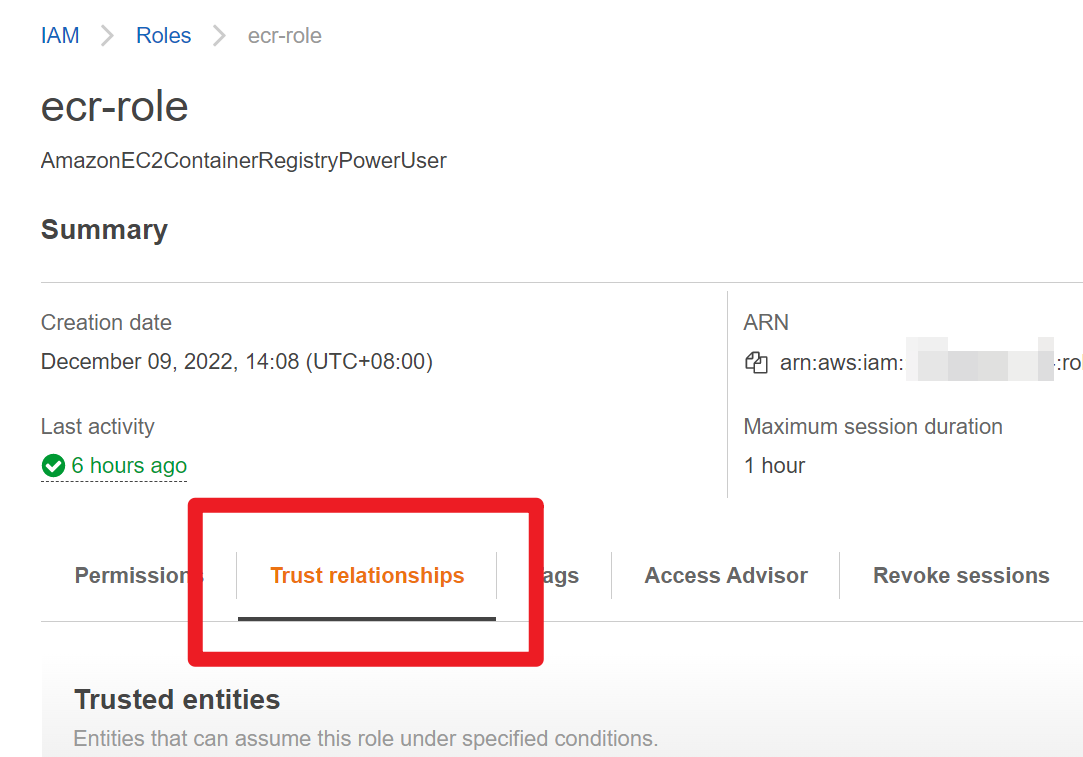
-
參考以下的方式將 sub 欄位加入到 Condition 中
-
方式一,使用
StringLike{ "Version": "2012-10-17", "Statement": [ { "Effect": "Allow", "Principal": { "Federated": "arn:aws:iam::123456123456:oidc-provider/token.actions.githubusercontent.com" }, "Action": "sts:AssumeRoleWithWebIdentity", "Condition": { "StringLike": { "token.actions.githubusercontent.com:sub": "repo:octo-org/octo-repo:*" }, "StringEquals": { "token.actions.githubusercontent.com:aud": "sts.amazonaws.com" } } } ] } -
方式二,使用
StringEquals"Condition": { "StringEquals": { "token.actions.githubusercontent.com:aud": "sts.amazonaws.com", "token.actions.githubusercontent.com:sub": "repo:octo-org/octo-repo:ref:refs/heads/octo-branch" } }
-
-
Updating your GitHub Actions workflow
上述是 AWS 相關設定,此步驟是調整 github workflow,做兩件事情 :
-
Adding permissions settings,有兩種權限選擇,可依照自身情境去選擇。
-
fetch an OIDC token for a workflow, then the permission can be set at the workflow level.
permissions: id-token: write # This is required for requesting the JWT contents: read # This is required for actions/checkout -
only need to fetch an OIDC token for a single job
permissions:
    id-token: write # This is required for requesting the JWT
-
-
Use the
aws-actions/configure-aws-credentialsaction- 此 action 會接收來自 GitHub OIDC provider 的 JWT,並且向 AWS 請求一組 access token
    - name: Configure AWS credentials
      uses: aws-actions/configure-aws-credentials@v1
      with:
        role-to-assume: arn:aws:iam::1234567890:role/example-role
        role-session-name: GitHubActionsWithAwsEcrUsingOIDCSession
        aws-region: ${{env.AWS_DEFAULT_REGION}}
參考資料
最後,若喜歡我的分享,可以免費幫我按讚,是對我最大的鼓勵!