為什麼我決定使用 Hugo & Github pages 建立一個 blog 系統?
1. 內容保存與控管
- ✅ 文章內容以 markdown 語法撰寫與保存,熟悉 markdown 語法後,會發現很方便 👍
- 推薦使用 vscode 作為編輯器
- ☝️ 加入 extension 可確認 markdown 內容呈現
- ✌️ 直接執行指令運行網站
- 推薦使用 vscode 作為編輯器
- ✅ 內容可定期放上雲端保存備份,不用擔心若部落格系統下線後,文章也跟著消失或者該如何備份
- ✅ 修改內容時,不怕線上部落格系統出現問題,輸入到一半的內容直接消失 ( 曾經有類似的經驗,全部重來 😓)
2. 可高度客製化
- ✅ 客製字體大小顏色、主題套件等 UI 的部分
- ✅ 自由決定要加入哪些功能,建立擁有自我風格的部落格系統 💪
- 評論區(支援不同多種軟體)
- LikeCoin button
- Table of contents
- 頁首與頁尾設計
- … etc
Hugo & Github pages 基本知識
1. Hugo 介紹
- 引用自官方文件說明
Hugo is a fast and modern static site generator written in Go, and designed to make website creation fun again.
2. Github pages 介紹
- 引用自官方文件說明
You can use GitHub Pages to showcase some open source projects, host a blog, or even share your résumé. This guide will help get you started on creating your next website.
Getting start,讓我們進入正題吧!
基本功能
1. Prerequisites
- Install Hugo,安裝能夠 compile go language 的工具,不同 OS 安裝不同的檔案
- Install Git,後續下載 theme 使用
2. Create a site
hugo new site quickstart
3. 到 quickstart 目錄,並執行 initial git repository
  cd quickstart
  git init
4. clone ananke theme,並以 git submodule 方式存在
-
若想了解 git submodule,可參考官方文件
git submodule add https://github.com/theNewDynamic/gohugo-theme-ananke themes/ananke
5. 設定 site configuration file
-
在
config.toml加入這行theme = 'ananke'
6. 本地啟動 hugo 專案
-
本地啟動 hugo 專案,
-p是指定 port 為 8080-
想知道更多 hugo 命令行可以點這邊
hugo server -p 8080
-
-
瀏覽器輸入
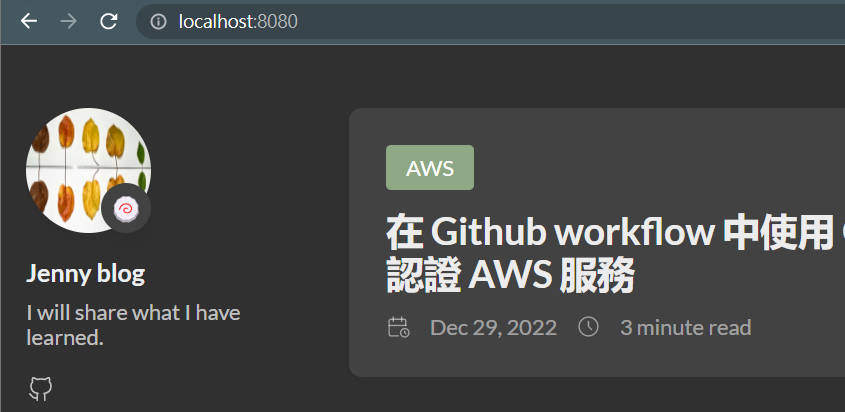
https://localhost:8080,可確認頁面已出現 (這時還沒有文章內容)
7. 開始寫文章
-
建立一個 markdown 檔案,markdown 檔案內的設定的意義
- title - 文章標題
- date - 建立此文章的時間,文章會跟著時間排序
- draft - 是否為草稿,production 環境建議只顯示非草稿的文章,寫完文章可改為 false,再執行 build 指令,讓 markdown 變成 html 等靜態檔案。
hugo new content/post/oidc-aws/index.md
8. 運行網站
-
寫完文章內容後 ✏️,設定 markdown 檔案內的 draft 為 false,表示
非 draft 模式,重刷頁面可看到文章-
若需要在
draft 模式下顯示文章,需調整啟動 server 的命令行-D表示--buildDrafts,會包含註記為 draft 的內容
hugo server -D -p 8080
-
-
成功 🚀 🚀 🚀
9. host on github page
- 設定 github pages,請參考 如何用 github pages host 靜態檔案
基本客製化功能
hugo 提供一些客製化功能,來看看應該怎麼做?
如何設定 publish 資料夾?
-
在
config.toml中加入以下設定,能將 publish 資料夾設定為docs,而 Github pages 能 host docs 資料夾內的靜態檔案publishDir = "docs"
如何替換成不同 theme?
我使用的主題是 hugo-theme-stack ( 官方文件 ),該如何調整?
- clone hugo-theme-stack theme
git submodule add https://github.com/CaiJimmy/hugo-theme-stack themes/hugo-theme-stack
- 調整
config.toml的設定值theme
theme = 'hugo-theme-stack'
如何客製化文章中的 font family?
-
調整
themes\hugo-theme-stack\layouts\partials\head\custom.html,內容如下- 以 google fonts 作為字體來源、以 css2 作為樣式來源
<style> :root { --article-font-family: "Literata", var(--base-font-family); } </style> <script> (function () { const customFont = document.createElement('link'); customFont.href = "https://fonts.googleapis.com/css2?family=Literata:wght@400;700&display=swap"; customFont.type = "text/css"; customFont.rel = "stylesheet"; document.head.appendChild(customFont); }()); </script> -
參考官方文件
如何客製化建立 index.md 的模板?
- 調整
archetypes\default.md - 有其他更進階的用法,請參考官方文件
進階客製化 ☝️ 如何在 Hugo 的文章中加入 LikeCoin button?
- LikeCoin 是強調內容有價的而出現的虛擬貨幣,可給作者支持與鼓勵
- 實作方式:
-
註冊 Liker ID
-
建立
themes\hugo-theme-stack\layouts\partials\likecoin.html<iframe class="LikeCoin" height="235" src="https://button.like.co/in/embed/{{ .Site.Params.likerID }}/button?referrer={{ .Permalink }}" width="100%" frameborder=0></iframe> -
在 config.toml 中加入以下程式碼,並將 [LikerID] 更改為你的 Liker ID
[Params] likerID = "YOUR_LIKERID" -
在文章的模板中加入 LikeCoin button
-
將以下的程式碼填入
themes\hugo-theme-stack\layouts\partials\article\article.html中{{ partial "likecoin.html" . }}
-
-
- 官方文件
進階客製化 ✌️ 如何使用 Google Console Search 偵測網站的收錄情況?
- 藉由了解網站成效,並針對弱點進行優化,可增加網站的曝光率 🌟
進階客製化 👌 SEO 搜尋引擎優化
- google 會依據網頁網址建立 index,搜尋結果會先呈現有建立 index 的網頁
- 因此為了強化網頁的 SEO,將你建立
sitemap交給 google ,讓 google 搜尋可快速找到你的網頁
注意事項
⚠️ 執行完 build 指令後,建議習慣檢查 docs 資料夾 ( 或你的 publish 資料夾 ) 內的 html 變化是否符合預期
心得
- 這應該是第二次使用 framework 方式建立靜態文件系統,第一次是使用 vuepress 協助公司建立內部文件系統,這次是使用 hugo。前者是以 javascript 為當作開發語言,後者是以 go 為開發語言。兩者都蠻推薦。
- 最重要的是了解該框架是如何運行的,在高度客製化功能或者修改問題的時侯才不會瞎子摸象般的亂試。
- hugo 有
64.5k🌟 (截止至 20230103),很多人持續貢獻與維護 🙏 ,因此軟體工程師從頭到尾依靠官方文件與 google 完成基本建立不難。